glass 1.7 · open-core · Apache-2.0
Your agent closes the loop.
An MCP server that gives an AI coding agent a closed build → see → interact → debug loop over native GUI apps — so it can build and debug UI itself instead of asking “does this look right?”.
-
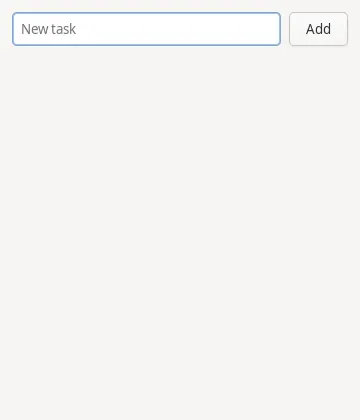
glass_start { run:["python3","tasks_demo.py"], a11y:true } → ok · 360×420 · 0.4s -
glass_a11y_snapshot → #4 TextArea · #5 Button "Add" · #7 List (empty) -
glass_click_element #4 (New task) → ok · field focused -
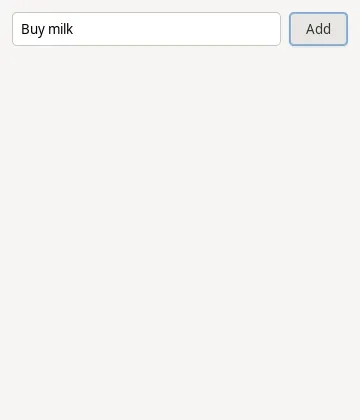
glass_type "Buy milk" → ok -
glass_click_element #5 (Add) → #7 List still (empty) — Add did nothing -
glass_stop → session ended -
edit tasks_demo.py + add.connect("clicked", self.on_add) -
glass_start { … a11y:true } → ok · a fresh, empty app -
glass_click_element #4 (New task) → ok · field focused -
glass_type "Buy milk" → ok -
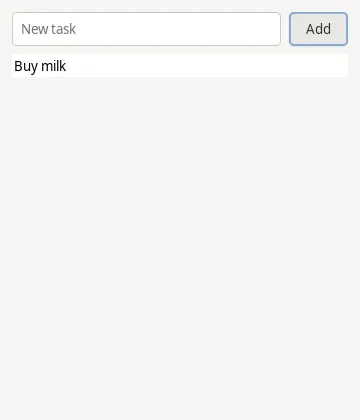
glass_click_element #5 (Add) → #9 Label "Buy milk" — the same click now lands

- self.entry.set_hexpand(True)
- add = Gtk.Button(label="Add")
- +add.connect("clicked", self.on_add)
- input_row.append(self.entry)
- input_row.append(add)
- box.append(input_row)
The loop
- 01 build glass launches your app (sandboxed by default) and captures its logs.
- 02 see Read the accessibility tree, screenshot the window, or diff regions — as text, so an agent checks a change without spending vision tokens.
- 03 interact Inject mouse, keyboard, scroll, and drag at window-relative coordinates.
- 04 debug Read the app's stdout/stderr and wait for elements, logs, or regions to settle.
glass_start           { "run": ["python3", "app.py"], "a11y": true }   // launch + private a11y bus
glass_a11y_snapshot                        // the tree: role, name, #id, bounds — as text
glass_click_element   { "id": 5 }          // click by #id, not pixels
glass_wait_for_element { "name": "Save", "condition": "enabled" }       // wait on state — no polling
glass_set_value       { "id": 4, "value": "hello" }   // set a field / toggle / dropdown
glass_logs                                 // read the app's stderr
Or drive by pixels — glass_screenshot, glass_click{x,y}, glass_diff — for a canvas or custom-rendered app with no accessibility tree.
Why it matters
Any app, any toolkit
glass drives apps as an external black box, so it works with any native GUI app regardless of toolkit or language — no SDK, no app integration. Drive it by pixels, or by its accessibility tree where one is exposed.
Cross-platform
Linux (X11 and Wayland), Windows, macOS, Android (an AVD emulator), and iOS (the Simulator) backends, behind a platform-agnostic core.
Cheap to verify
Text-only diffs and waits let an agent check between screenshots without spending vision tokens on every step.
Sandboxed by default
Launched apps are contained by default; the default level fails closed rather than running an app unconfined.
Quickstart
Download the binary, verify the environment, then register it with your agent.
# 1. Download the latest release for your platform and extract it
#    → github.com/fixed-width/glass/releases/latest
tar xzf glass-mcp-*-x86_64-linux-gnu.tar.gz
cd glass-mcp-*-x86_64-linux-gnu

# 2. Verify the environment (prints a remedy for any gap)
./glass-mcp doctor

# 3. Register it with your agent (stdio)
claude mcp add glass --scope user -- /absolute/path/to/glass-mcp
Drive it well: install the open glass-drive Agent Skill ↗
— npx skills add fixed-width/skills -s glass-drive — so your agent arrives knowing the
verify-cheaply-then-look loop instead of spending its first turns rediscovering it. Optional, but the
single highest-leverage thing you can add.
First drive: grab the bundled examples/tasks-demo/tasks_demo.py ↗ (a tiny app with a bug), then ask your agent: “Use glass to run examples/tasks-demo/tasks_demo.py with accessibility on. Clicking Add doesn't add the task — reproduce it from the accessibility tree, fix the code, and verify.” Watch it close the loop.
On macOS? Install the notarized .dmg ↗ and double-click it instead. Prefer to build from source ↗? It's a single cargo build. Full setup, sandboxing, and network/HTTP detail are in the docs ↗.